

+ Education · September 2026
Elementor MCP: What It Means to Connect Artificial Intelligence Directly to WordPress
Elementor MCP connects tools like Claude, Codex, and Cursor with WordPress to create a native, editable structure. What it is, how it works, its limitations, and why human judgment remains key.
Article
AI is being integrated into the WordPress workflow.
In recent years, we have seen Artificial Intelligence become integrated into virtually every stage of digital development. It first emerged as a tool for drafting content. Later, it began generating code, analyzing errors, organizing information, producing documentation, and assisting developers through tools such as Cursor, Claude Code, and Codex.
But there was one major limitation.
It’s one thing for an AI to tell you what code to write or to prepare a section for you to later import into WordPress. It’s quite another for it to be able to understand the actual structure of your website and work directly within it.
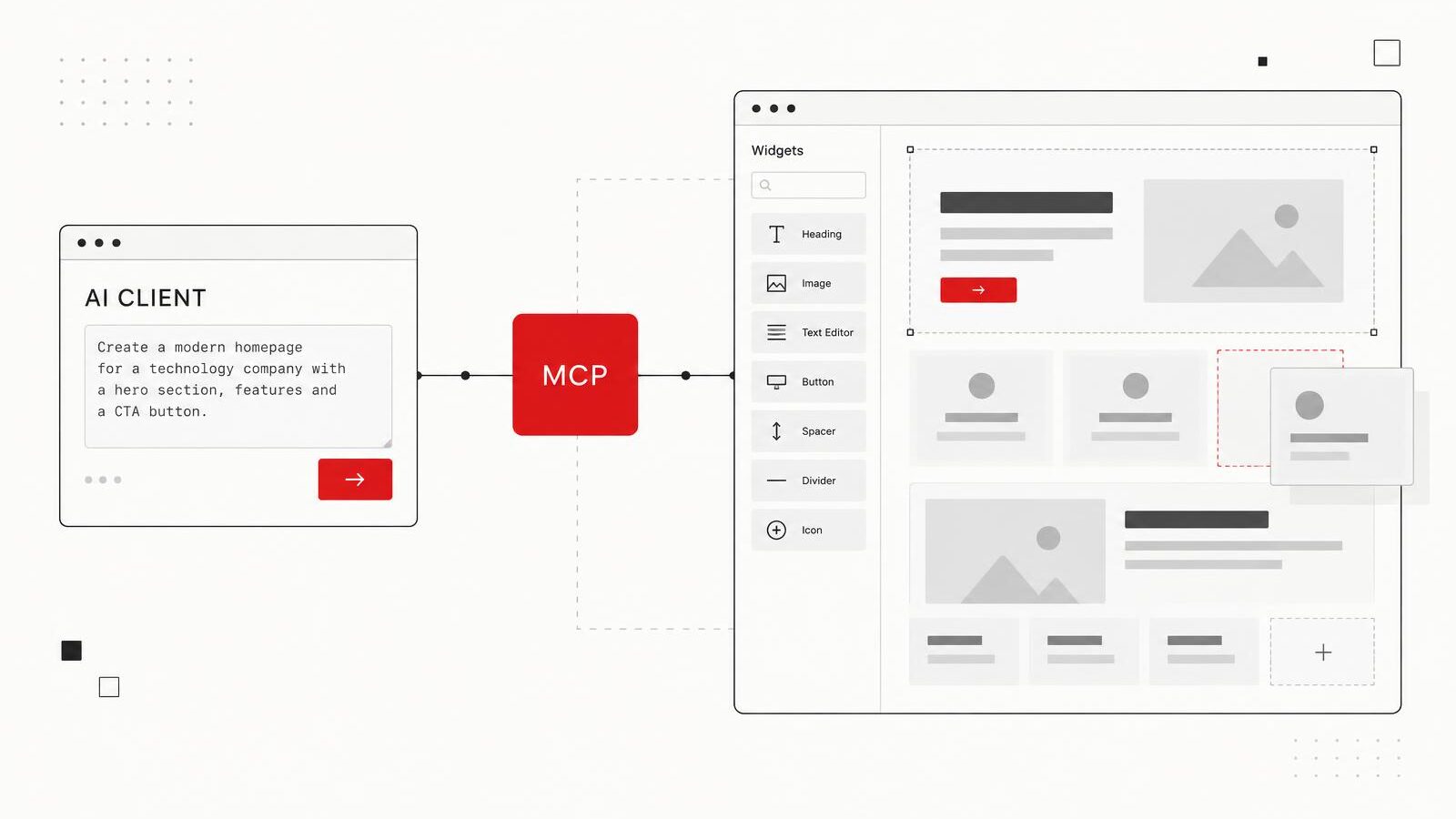
That is precisely the change that Elementor began introducing in September 2026 with the official launch of Elementor MCP, an integration that allows users to connect external tools compatible with the Model Context Protocol—such as Claude, Codex, and Cursor—directly to a website built with WordPress and Elementor. Once connected, these tools can work with actual Elementor pages, structures, styles, and components, keeping the result editable within the editor itself.
It might sound technical.
But we're probably looking at one of the most significant changes to the WordPress workflow in years.
+
First, what is MCP?
MCP stands for Model Context Protocol.
It is an open standard designed to allow artificial intelligence applications to connect in a structured way with external tools, data, and systems. The protocol’s official documentation uses a rather effective analogy: MCP aims to work for AI applications the way USB-C works for electronic devices. Instead of developing a completely different integration for every combination of AI and platform, there is a common protocol through which they can discover capabilities and exchange information.
The concept can be understood with a simple example.
ChatGPT, Claude, or any other model may be very good at interpreting an instruction, but on their own, they don't necessarily know which pages exist on your WordPress site, what the website's global styles are, what content is published, how a template is structured, or what features a particular plugin has.
MCP creates a standardized bridge that allows an AI application to discover that context and, when authorized, use the tools made available by the system.
From a technical standpoint, MCP uses a client-server architecture. The server can expose tools, which allow actions to be performed; resources, which provide information and context; and prompts, which function as reusable templates for specific workflows. The artificial intelligence application can discover what is available before attempting to use it.
In other words, AI is no longer completely on the outside, looking in.
Now, a structured conversation can take place between the AI and the software.
Graph +
How MCP Works, in Simple Terms
The AI application doesn't guess: it identifies which tools, information, and templates the system provides and uses them only if authorized.
+
Why is this especially important for WordPress?
WordPress is extraordinarily flexible precisely because there isn't just one way to build a website.
One project might use Gutenberg. Another might use Elementor. Yet another might add WooCommerce, Advanced Custom Fields, Yoast, APIs, custom post types, CRM integrations, and dozens of additional plugins.
That flexibility has been one of WordPress's greatest strengths, but it also poses a problem for artificial intelligence: each installation can be different.
How does an AI agent know what it can do within a specific WordPress installation?
WordPress has begun to address that question through its Abilities API, an architecture that allows functionality units to be registered in a structured way, with defined inputs, outputs, and permissions. According to the official WordPress documentation, these abilities can later be discovered by other parts of the system or by external agents.
The WordPress MCP Adapter adds another layer: it can turn those abilities into tools that an MCP-compatible AI agent can discover and execute.
That represents a significant architectural change.
We're not just adding a chatbot to the WordPress admin panel.
We're starting to provide the ecosystem with a standardized way to tell an Artificial Intelligence:
“These are the things this website can do, these are the ones you can use, and these are the conditions under which you can do so.”
+
So, what did Elementor do?
Elementor brought that architecture directly into the visual building process.
With Elementor MCP, a compatible third-party tool can connect to the website and use the editor's actual capabilities. Elementor explains that the developer can create pages, build layouts, work with Atomic Elements, use classes and variables from the design system, connect dynamic data, and modify existing compatible structures.
The difference compared to a traditional code generator is significant.
The result doesn't have to end up as an unrecognizable block of AI-generated HTML that no one wants to touch six months later.
Elementor states that content generated via MCP retains its native, editable Elementor structure. This means that the designer, developer, or client can later open that page within the editor and continue working as usual.
For an agency, that difference is worth a lot.
The handoff is still working.
The client still has Elementor.
The team still has a clear view of the structure.
And AI becomes part of the workflow, not necessarily a replacement for it.
Graph +
AI outside the website vs. AI integrated into the workflow
Before
- Prompt
- AI generates code / instructions
- Copy / paste
- Manually adjust
- WordPress
Now with MCP
- Prompt
- AI client
- MCP
- Elementor
- Native editable structure
The previous workflow does not disappear. MCP adds another way of working when the project and the installation allow it.
+
How does Elementor MCP work in practice?
The current configuration is done through the WordPress admin panel.
A new section called "Elementor MCP" appears within Elementor. From there, an administrator can enable access and select a compatible tool, including options ready for Claude Code, Claude Desktop, Codex, and Cursor. There is also an option for other clients that use the MCP protocol.
Elementor then generates the information needed to establish the connection, including a WordPress application password. That configuration is copied to the selected AI tool, allowing you to connect to that specific website.
Once connected, the AI can discover the exposed capabilities and use those that correspond to the user's instruction.
Conceptually, the flow looks something like this:
Person → AI tool → MCP → WordPress / Elementor → editable page → human review → publication
That last step is particularly important.
Creation does not automatically mean publication.
Graph +
From an instruction to an editable page
- Person
- AI toolClaude / Codex / Cursor
- MCP
- WordPress
- Elementor
- Draft
- Human review
- Publish
Human review takes place before publication. That step is not optional for a commercial website.
+
Creating is not the same as publishing
One of the best decisions made during this initial implementation is to keep execution and publishing separate.
According to Elementor’s current documentation, an agent can save what they create as a draft or publish it, but only when you ask them to and within the scope of your WordPress user’s permissions. Nothing is published automatically simply because an agent has made a change. The user can review the result within the editor, use “Preview Changes,” and then decide whether to publish or continue working.
This upholds a principle that I consider essential when integrating AI into client websites:
human in the loop.
AI can do that.
But someone has to review it.
Especially on a commercial website, where a decision can affect branding, accessibility, UX, forms, tracking, SEO, legal information, or conversions, the speed of execution should never override the validation phase.
+
A practical example: building a landing page
Let's imagine we need to develop a landing page for a campaign.
Traditionally, we can start with a brief, develop wireframes, work on the design, prepare the content, and then build the page in Elementor.
With MCP, certain mechanical parts of that process can be accelerated.
A team could grant an agent access to project documentation and ask them to create the initial structure in Elementor following the existing design system.
AI could build containers, headings, content blocks, sections, and compatible elements directly as a native structure.
The team doesn't have to copy code from another window.
You don't have to manually reconstruct every section that the model described.
You can start the next step from an existing structure within Elementor.
But that doesn't mean we should accept the first composition he produces.
That's where UX/UI, art direction, content, responsive design, testing, and human judgment come into play once again.
The benefit lies in reducing mechanical labor, not in giving up control.
+
The design system is where things start to get really interesting
For me, one of the capabilities with the greatest potential isn't necessarily asking the AI, "Make me a website."
It means allowing them to work within a system that already has rules.
A professional website should typically have consistent definitions for colors, typography, spacing, buttons, components, sizes, and other design elements.
Elementor MCP can work with classes and global variables from the design system. Among its use cases, Elementor even highlights the ability to generate and apply colors, typography, and sizes consistently.
That can radically change the quality of automation.
AI would no longer have to come up with a "red button" on the spot just because “it seemed like a good idea.”
You can use the class that the team has already defined for the primary buttons.
That's the kind of AI I find much more interesting for professional production: not a machine making every decision on its own, but a tool that operates within the parameters of the decisions the team has already established.
Graph +
AI works best within rules defined by humans
Design system
- Colors
- Typography
- Spacing
- Classes
- Variables
- Components
“Value isn’t just about creating. It’s about creating within a system.”
+
From Figma or a document to Elementor
Elementor also provides workflows where agents can use information from other connected tools.
For example, if the AI tool already has access to Figma, Google Drive, Notion, or another system through its own integrations, it can use that information to build structure within Elementor. Elementor explicitly highlights this type of workflow among MCP’s current capabilities.
This highlights one of the most important characteristics of MCP as a concept.
It's not just about connecting AI to Elementor.
The goal is to start connecting entire workflows.
We can imagine:
- Brief on Drive.
- Customer information in another system.
- Design or reference in Figma.
- AI interpreting those resources.
- WordPress as a CMS.
- Elementor as a visual builder.
- All communication takes place through standardized integrations.
That's where MCP starts to seem less like a new feature and more like infrastructure.
Graph +
Use Case: From the Brief to Elementor
- Brief
- Figma / Doc
- AI
- Elementor
- Review
Figma, Google Drive, and Notion provide context only if the AI tool already has access to them through its own integrations. Elementor does not automatically connect to those platforms.
+
Theme Builder, dynamic content, and full pages
Nor is the current scope limited to a single section.
The Elementor documentation describes how to create entire pages, configure titles and slugs, and develop structures such as post templates using dynamic information. The official example itself shows a user creating a shared template for articles and linking elements such as the featured image, title, date, author, and post content.
Elementor also announces support for theme parts such as headers, footers, post templates, and 404 pages.
This can have a particularly significant impact on projects that involve many repetitive structures.
AI can be extraordinarily useful in tasks that we humans find boring precisely because they are repetitive.
+
What about WooCommerce, ACF, Yoast, and other plugins?
Here, the integration with WordPress Abilities becomes even more interesting.
Elementor states that, through Angie and the capabilities registered within the WordPress ecosystem, features from other plugins can be utilized, including examples such as WooCommerce, Yoast, and ACF.
That could enable workflows that go far beyond simply editing a page.
An agent could eventually work with products, structured content, dynamic information, or certain operations logged by other plugins.
But there is an important distinction to make: not all Elementor MCP features require Angie, but certain advanced capabilities do.
Elementor currently states that basic creation and editing of pages, sections, and theme parts can be done directly within Elementor, while integration with other plugin features, WP Admin customizations, custom widgets, and bulk content actions require Angie.
+
There are significant limitations in this first stage
This technology has just been introduced, and we shouldn't present it as if every Elementor project from the past ten years could be seamlessly managed by an agent starting today.
One of the main limitations is Elementor's architecture.
Editing existing structures using MCP is currently focused on Atomic Elements and Elementor V4 layouts. The official sources we've reviewed have not yet confirmed editing support for earlier layouts based on V3 widgets, so it's best not to assume it's available.
That matters a great deal because there are a huge number of websites that have been built over the years using Elementor's previous architecture.
For agencies like Alterno, which manage both new projects and legacy websites, this means we must evaluate each installation before deciding how much of the new workflow can be used.
There isn't yet a magic button to automatically convert any older WordPress site into a fully responsive website.
And it's probably better that way.
+
What Elementor MCP Can Do Today
A quick overview of the features based on the official documentation from September 2026. We’ve broken down what’s available today, what requires Angie, and what hasn’t been confirmed yet.
- PagesCurrent
- Create new pages with a title, slug, and template, built using Elementor V4 Atomic elements.
- LayoutsCurrent
- Build sections and layouts using Flexbox and Grid containers, text, accordions, background videos, and Loop Grids.
- Theme PartsCurrent
- Headers, footers, post templates, archives, 404 pages, and pop-ups with display conditions.
- Design systemsCurrent
- Create and apply global classes and variables for color, typography, and spacing, as well as states such as hover and responsive rules.
- Dynamic dataCurrent
- Link elements to post fields, custom fields, and taxonomies.
- EditingCurrent
- Edit or redesign existing Atomic pages and layouts. Official sources have not yet confirmed the release of V3 layouts based on widgets.
- AutomationAngie Requires
- Bulk actions on hundreds of products or posts, data cleansing, SEO fixes, custom widgets, WP Admin customization, and features of other plugins such as WooCommerce, Yoast, or ACF.
Technical note: Elementor lists WordPress 6.8 or higher and Elementor Core and Pro 4.3.0 or higher as requirements for Elementor MCP. Meanwhile, WordPress incorporated the Abilities API into its core starting with WordPress 6.9 as native infrastructure.
+
Security: Granting an agent access is no small matter
MCP also raises an issue that we must not ignore.
When we connect an AI agent to a website, we’re no longer just sending it a question.
We are empowering you to take action.
That's why permissions, authentication, and governance matter.
Elementor restricts initial MCP configuration to website administrators and uses WordPress application passwords for connections. Agents inherit permissions from the authorized user and should not be able to perform actions that the WordPress role does not allow. Individual connections can be revoked later from the user's profile, and the MCP can also be completely disabled from within Elementor.
Elementor also includes conflict detection when a user and an agent attempt to edit the same page simultaneously. The editor can alert the user to the situation and allow them to choose between keeping the current session active or reloading the changes made externally.
In production, I would add an even simpler recommendation:
Backup, staging, and review before publishing.
Artificial Intelligence does not eliminate best practices in development.
That makes them even more important.
Alterno 's Recommendation Before Making Major Changes
- 01Backup
- 02Staging
- 03Review
- 04Testing
Controls available today: Only administrators can configure the MCP; connections use application passwords; agents operate with the WordPress user’s permissions; each connection can be revoked; the MCP can be disabled for the entire site; and Elementor alerts you when a user and an agent are editing the same page. These are safeguards, not an absolute guarantee.
+
Does this mean the end of Elementor developers and designers?
I don't see it that way.
In fact, I think the question misses the point of where professional value really lies.
Moving containers, duplicating components, entering repetitive content, or creating initial structures takes time, but that's not necessarily where most of the judgment comes into play.
Deciding how an experience should work, how we organize information, how it adapts to different screen sizes, how we build hierarchy, how we make an interface accessible, how we measure conversions, how we integrate systems, and how we maintain performance still requires expertise.
AI can begin to take on a larger share of the mechanical execution.
That can free up time to give more thought to decisions.
At Alterno , that is exactly the address we're looking for.
Don't use AI just because it can generate something.
Use it when it can help us work faster or more efficiently without sacrificing strategy, design, technology, or control.
+
What really matters isn't that you can type "create a page for me"
Artificial Intelligence demos tend to focus on the spectacular moment.
You write a sentence.
A page appears.
Visually, it's impressive.
But when it comes to real work, the most important part comes afterward.
- Did you use the design system correctly?
- Does the HTML make sense?
- Is it responsive?
- Does content hierarchy work?
- Does it comply with accessibility standards?
- Is the form connected?
- Does Analytics track correctly?
- Do events work?
- Is the experience quick?
- Will it still be viable in six months?
- Can another team member edit it?
- In this regard, Elementor's announcement is interesting precisely because it attempts to answer part of that last question.
The content is still generated by Elementor.
Not a separate black box.
+
The impact may be greater in maintenance than in creation
Although building entire pages using prompts makes for great headlines, I think that in the long run, some of the most valuable applications will be put on hold.
Update repetitive content.
- Identify pages with outdated information.
- Correct structures.
- Create new landing pages using an established system.
- Replicate components correctly.
- Check for consistency.
- Working with hundreds of records.
- Identify technical SEO opportunities.
- Apply changes that would take hours to implement manually.
- Elementor already includes content optimization at scale and SEO fixes among its use cases, although some of those features require Angie.
For large organizations, that kind of automation can be far more transformative than creating a pretty hero.
+
WordPress is gearing up for a more agent-based web
Elementor isn't going it alone either.
WordPress is actively developing infrastructure related to AI. The Abilities API was introduced as a foundation for recording capabilities in a structured way, and the MCP Adapter allows these capabilities to be exposed to compatible agents.
This points toward a larger transformation.
In the early days of the web, we navigated interfaces to tell the software what to do.
We were logging into the dashboard.
- We opened Pages.
- We were looking for a website.
- We clicked on "Edit."
- We found the component.
- We were making the change.
- We were saving it.
- An agent may receive:
“Update the event date on the five pages where it appears, but don’t post anything until I’ve reviewed it.”
And you can use the available capabilities to try to run that workflow.
The interface does not disappear.
But it is no longer the only way to use the software.
+
So, why does Elementor MCP matter?
Because it represents a shift from AI as an external generator to AI as a controlled participant within the system.
That's quite different.
The agent can understand the structure.
You can discover new abilities.
You can perform authorized actions.
It can produce elements that remain editable.
And it can integrate seamlessly with your existing WordPress and Elementor workflow.
We're still in the early stages. There will be limitations, errors, version updates, and many things we shouldn't automatically delegate.
But the direction is quite clear.
The future of web development will likely not come down to choosing between building things manually and letting Artificial Intelligence handle everything.
It will involve learning to decide what the individual should do, what the system can do, and how both work within a structure that ensures control, quality, and accountability.
For those of us who have been developing websites with WordPress and Elementor for years, that could indeed be a significant change.
Not because the Editor will disappear.
But because now there's another way to talk to him.
⸻
Frequently Asked Questions
Elementor MCP: FAQs.
What is Elementor MCP?
This is Elementor's implementation of the Model Context Protocol. It allows external AI tools to connect with a WordPress and Elementor website so they can leverage the editor's actual capabilities and generate native, editable content.
What does MCP stand for?
Model Context Protocol: an open standard that enables artificial intelligence applications to connect in a structured way with external tools, data, and systems.
What is MCP used for in WordPress?
It allows AI tools to discover and use, with authorization, capabilities that WordPress or its plugins expose in a structured way through the Abilities API and the MCP Adapter.
Which tools work with Elementor MCP?
According to the current Elementor documentation: Claude Code, Claude Desktop, Codex, Cursor, and other clients compatible with the MCP protocol (the “Other” option).
Does Elementor MCP publish automatically?
Not on their own. The agent can save a draft or publish only when asked to do so and within the WordPress user's permissions. It is recommended to work on a draft, review it using "Preview Changes," and have someone approve the publication.
Does Elementor MCP replace the designer or developer?
No. It can speed up the technical implementation, but strategy, architecture, UX/UI, branding, responsiveness, accessibility, performance, testing, measurement, and final approval still require professional judgment.
Does it work with older Elementor websites?
Not necessarily. This edition focuses on Elementor V4, Atomic Elements, and Atomic layouts. Official sources have not yet confirmed support for V3 widget-based layouts, so each installation must be evaluated.
Do I need Angie?
Not for everything. Creating and editing pages, sections, and theme parts works with Elementor. Angie is required for features provided by other plugins, custom widgets and applications, WP Admin customization, and bulk content actions.
Sources
Sources and References
- Elementor — Introducing the Elementor MCP, September 23, 2026
- Elementor Help Center — How to Connect Elementor to an AI Tool Using MCP
- Elementor Help Center — How to Build and Edit Your Site Using Elementor MCP
- Elementor — Elementor MCP
- Model Context Protocol — Official Documentation
- WordPress Developer Resources — Abilities API
- WordPress Developer Blog — From Abilities to AI Agents: Introducing the WordPress MCP Adapter
Last technical review: September 2026.
Tags
Topics in this article.
Let's talk
WordPress is changing. So is the way we develop.
At Alterno , we specialize in web development, WordPress, Elementor, integrations, APIs, automation, and artificial intelligence—but our goal goes beyond simply using new technology: we aim to use the right technology to best solve the challenges of each project. If you’re considering developing, redesigning, or modernizing a website or platform using WordPress, we can help.
REQUEST A PROPOSAL +Conversation +
Comments.
0 published
Your input helps this conversation grow. Share your comments, questions, or experiences related to this article—we're here to listen.
Be the first to comment.
Continue reading
More from the blog.
Services · March 2026
Beyond the website: we develop custom digital platforms and solutions
We develop custom platforms, APIs, databases, dashboards, and integrations that connect websites, CRMs, POS systems, and other systems to address real business needs.
Read the article +Education · July 2026
SEO + AI: How to Prepare Your Brand for the New Era of Search
The way we search is changing. Find out how to optimize your website, content, and brand for Google and the new search experiences powered by artificial intelligence.
Read the article +Education · April 2026
How to Write a Good AI Prompt: The Science, Engineering, and Human Judgment Behind Effective Instructions
A good prompt is less like a password and much more like a good brief: it defines the problem, provides context, sets priorities, and explains what result we need. The science behind a good prompt begins with technology but ends with human judgment.
Read the article +

+ Ideas That Keep Moving Forward
Get the next article.
Creativity, marketing, digital advertising, technology, and artificial intelligence—delivered straight to your inbox.
Let's get to work